Google Search Console surfaces about a dozen different indexing and coverage reports. The two that almost always deserve priority attention are “Not found (404)” and “Crawled – currently not indexed.”
In a recent audit, those two reports flagged 107 URLs. Twenty-seven as 404s. Eighty as Crawled but not indexed. What’s worth knowing is that nearly half of that list didn’t need individual action at all – and understanding which half saves hours of unnecessary work.
Here’s the triage framework I apply to these two reports, why I prioritize them over the others GSC shows you, and what the 107-URL breakdown actually looked like.
The Two Reports, and Why They Require Different Thinking
“Not found (404)” and “Crawled – currently not indexed” often get lumped together. However, they’re fundamentally different problems with different decision trees.
A 404 means Google tried to access a URL and the server said: “This doesn’t exist”. The decision is about what to do with any historical value tied to that URL – backlinks, traffic, internal references – and whether the URL should be permanently closed (410) or redirected to a living destination (301).
“Crawled – currently not indexed” means Google successfully accessed the URL, read it, and did not include it in the index. The question is why – thin content, duplication, topical irrelevance, technical signals – and whether that outcome is aligned with your intent.
Conflating these two reports leads to bad decisions. Each requires a different decision tree, so they should be handled separately.
The Starting Point
This audit covered a WordPress installation with Elementor for design and Rank Math managing the site’s SEO configuration and redirects. Before touching anything, I exported both GSC reports as CSVs. That’s step zero: never work from the GSC interface directly – you’ll lose track of what you’ve done.
Looking at 107 URLs can feel overwhelming until you do something simple: paste them into a spreadsheet and sort them by URL pattern. Suddenly, the chaos resolves into categories. Date archives. RSS feeds. Wildcard patterns. UTM parameter variants. A handful of actual content pages buried in the noise.
That pattern recognition is the single most valuable skill in this kind of audit. Most of what ends up in GSC’s indexing reports falls into two buckets: automatic WordPress behavior or crawl artifacts. Neither represents genuine problems with your content.
Not Every Indexing Issue Is Actually an Issue
A pattern that takes experience to move past: treating every flagged URL as a problem to fix.
For example, the site had about 22 RSS feed URLs in the “Crawled – currently not indexed” report. The instinct is to add Disallow: */feed/ to robots.txt to block Google from crawling them. It seems logical – if Google isn’t indexing them anyway, why let it waste crawl budget?
Wrong move.
If you block URLs currently in the “Crawled – currently not indexed” state (like RSS feeds) in robots.txt, you prevent Google from continuing to evaluate them or from detecting any noindex signal in the future. If Google later encounters internal or external links pointing to those blocked URLs, it can index them “blindly” based on those link signals alone. As a result, a harmless natural status becomes a real “Indexed, though blocked by robots.txt” problem in GSC.
This behavior aligns with Google’s robots.txt documentation, which clarifies that robots.txt controls crawling, not indexing. The two work very differently.
Technical Note: The X-Robots-Tag Alternative
For the rare cases where you genuinely need to deindex a non-HTML resource like an RSS feed, use the X-Robots-Tag HTTP header (easily configurable in Rank Math) instead of robots.txt. This is a crucial distinction: since XML feeds don’t have a <head> section, standard meta noindex tags won’t work. The HTTP header is the only legitimate way to signal deindexing intent for non-HTML files directly to Google.
The rule: “Crawled – currently not indexed” is the expected state for certain URL types.
These include:
- RSS feeds (/feed/ URLs)
- WordPress login pages (wp-login.php)
- robots.txt itself
- WordPress system files under /wp-includes/ and /wp-content/
- Thin archive pages
Google needs to crawl these. Feeds help it discover new content. Robots.txt defines crawl rules. System files (like CSS and JavaScript) are necessary for Google to properly render and evaluate the pages it does index. However, none of these belong in the search index. The “issue” in GSC is just Google reporting what it did, not asking you to fix anything.
For this site, 29 URLs fell into this “leave alone” category in the Crawled-not-indexed report alone.
Recognizing that upfront saves hours.
The Triage System
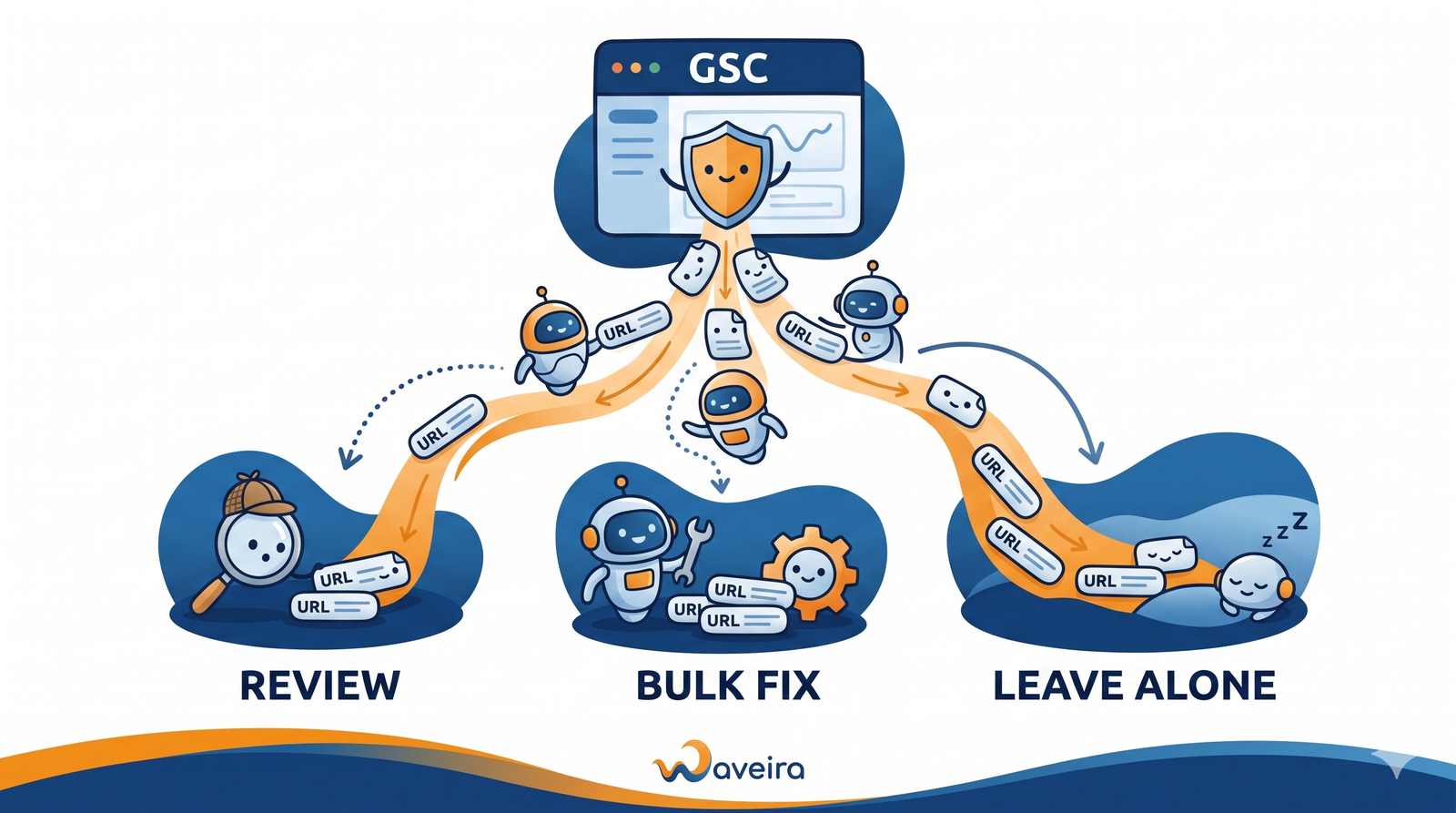
Once the “don’t touch” URLs are separated, the remaining ones split into four categories based on effort required:
Ignore on purpose (~47 URLs). This includes the “leave alone” expected-state URLs across both reports (RSS feeds, login pages, system files, robots.txt), plus system artifacts like WordPress wildcard patterns and draft previews.
Bulk fixes in WordPress (~27 URLs). All the date archive pages (/YYYY/MM/ and /YYYY/MM/DD/ format) handled by a single setting in Rank Math: Titles & Meta → Date Archives → Disabled. Done in 30 seconds. Same principle for author archive pagination – one setting disabled 3 paginated URLs while keeping the primary author pages live for E-E-A-T purposes.
Canonical checks (~8 URLs). These were UTM parameter variants like /case-studies/?utm_campaign=xyz and similar parameter-based URLs. No fix needed in most cases – just verification that the canonical tag on the clean URL pointed correctly. View source, Ctrl+F “canonical,” check the href. Two minutes per URL. If the canonical was clean, the parameter variants can be safely ignored in GSC.
Real content decisions (~25 URLs, across both reports). Blog posts, service pages, and hub pages where I had to make real judgment calls. Nine of these sit in the 404 report (covered in Part One below), the remaining 16 in the “Crawled – currently not indexed” report (Part Two).
Notice the breakdown: of 107 URLs flagged, only 25 required thoughtful individual review. The rest were either bulk fixes or intentional no-ops. Trying to give each URL the same deep analysis wastes days.
Part One: The 27 × “404/Not Found” URLs
The 404 report is usually faster to resolve because most of what shows up there is either system noise or clearly obsolete content.
- Of the 27 URLs, nine were robots.txt wildcard patterns and WordPress internal paths (/wp-content/plugins/*, /wp-admin/*, and similar). These aren’t real URLs – they’re patterns Google encountered while parsing your robots.txt or attempting to crawl restricted WordPress paths. No action required. Ignoring them is not neglect; it’s the correct response.
- Four were RSS feed URLs for posts that no longer exist. Also no action. Feeds don’t need redirects when their parent content is gone.
- Three were WordPress preview URLs (?page_id=XXXX) – internal WordPress artifacts that occasionally leak into crawls. Nothing to do.
- One was an old plugin asset file (a file that shipped with a theme or plugin no longer installed on the site) – it simply no longer exists, which is correct behavior.
- One was a deprecated paginated archive that will naturally drop out of Google’s index over time. No intervention needed.
That leaves nine URLs that required actual decisions:
- A testimonial page for a person no longer featured
- An old case study from the original site architecture
- A deprecated FAQ page
- An old service page for a service type no longer offered
- Two old service package URLs that no longer exist as standalone pages
- A landing page for a user persona the site no longer targets
- An old WordPress category page
- A truncated URL (someone had linked to the site with a malformed URL)
For each, I ran a backlink check to see if they had accumulated any link equity worth preserving. Eight of the nine had zero referring domains. One had four backlinks from a single scraper domain flagged as spam – functionally zero value.
Decision for all nine: 410 Gone.
410 vs 404: The Real-World SEO Difference
HTTP 410 (Gone) sends a more explicit server-level removal signal than the standard 404 (Not Found). However, in practice, there’s no measurable SEO difference: both statuses lead directly to deindexation and stop wasting crawl budget. According to Google’s documentation on HTTP network errors, the processing difference is minimal enough that investing extra engineering effort into configuring 410 purely for SEO reasons is no longer worth it.
I still used 410 here – it keeps server logs cleaner and documents the intent of removal – but a standard 404 would have produced the same SEO outcome. In Rank Math, simply add the URL and set the redirection type to 410 Gone.
One judgment call worth noting: if any of those nine URLs had returned meaningful backlinks – let’s say 3+ referring domains from real sites – I would have 301-redirected instead, pointing to the most topically relevant surviving page.
Link equity is worth preserving.
Link equity from spam is worth ignoring.
Part Two: The 80 × “Crawled-Currently Not Indexed” URLs
This is where the real audit work happens, but most of the URLs resolve quickly once you’ve sorted them by pattern.
Roughly a Third of Flagged URLs Don’t Need to Be Fixed
The most important insight from this audit: a significant share of “Crawled – currently not indexed” entries represent the expected handling for that URL type, not a problem. RSS feeds, WordPress login pages, robots.txt, and WordPress system files all fall into this category.
A common mistake worth noting here one more time (because it’s a tempting but dangerous “fix”) is adding Disallow: */feed/ to robots.txt to “clean up” the report.
For URLs already seen by Google, blocking them in robots.txt doesn’t remove them from the index – instead, it just prevents future crawls and future noindex detection. If Google finds link signals pointing to those blocked URLs, it can end up indexing them blindly based on those signals, converting a harmless “Crawled – currently not indexed” status into a real “Indexed, though blocked by robots.txt” problem. Leave these URLs alone.
Of the 80 flagged URLs, 29 fell into this “leave alone” category – mostly RSS feeds (22), a handful of WordPress login page variants (3), WordPress core CSS files (3), and robots.txt itself.
Bulk Fixes at the Plugin Level
Another 24 URLs were WordPress date archives (/YYYY/MM/ and /YYYY/MM/DD/ format). WordPress generates date archives by default, and on most sites they create classic thin and duplicate-content problems. They don’t add anything new. Instead, they just regroup posts that already exist in your main categories, offering no unique value to the user. As a result, Google typically classifies these URLs as low-value pages and declines to index them.
Unless you run a news portal where chronological browsing is essential to user intent, the technical best practice is to disable or noindex date archives globally through your SEO plugin (Rank Math or Yoast). One click resolves the entire category.
Same principle for author archive pagination – three URLs resolved by disabling author archive pagination in the SEO plugin settings, while keeping the primary author pages active. On a multi-author site, primary author pages support E-E-A-T and increasingly matter for AI search systems that use author entities for attribution and authority graphs. The paginated variants add no unique value and typically end up in “Crawled – currently not indexed” for thin content reasons.
Eight URLs were parameter variants – UTM tracking parameters (/page/?utm_source=…), paginated blog URLs with view-mode parameters (?mode=grid), and one legacy Google Analytics plugin parameter. For these, I didn’t need to take action on the parameters themselves. Instead, I needed to verify that the canonical tag on the clean version of each page pointed correctly. All checked out.
The 16 Content Decisions in This Report
Once the bulk categories were handled, the remaining 16 URLs were genuine content decisions – blog posts, service pages, guides, and hub pages.
For each, I ran three checks in parallel:
Backlink profile. Referring domains matter far more than total backlinks. Fifty links from one domain is one RD – a weak, easily-devalued signal. Five links from five distinct domains is a real authority signal. When analyzing individual URLs, filter your backlink tool to show only backlinks pointing to that exact URL, not the broader path.
Topical alignment. Does this URL’s subject belong on this site? The site’s topical authority was clearly defined, and a few URLs in the flagged list covered topics that fell outside it. Zero backlinks plus off-topic content plus thin word count equals an easy 410.
Duplicate check. For each URL, I searched the site to see if another page covered the same topic. Google doesn’t technically recognize keyword cannibalization as a negative ranking factor per se. However, when multiple URLs on the same site offer overlapping content that satisfies the same user intent (for example, a shorter blog post and a comprehensive guide), Google treats this as a redundancy and filtering problem. This often manifests as ranking volatility, where Google’s inability to commit to a single ‘best’ version causes pages to swap positions or drop out entirely.
The algorithm identifies the page with more authority and information as the primary version. The weaker URL often ends up in “Crawled – currently not indexed.” The reason isn’t that another URL “cannibalized” it. Instead, after crawling, Google judged that the content didn’t offer enough Information Gain – a concept from Google’s patents referring to unique additional value – to earn a spot in the index.
The Decision Matrix
This is the framework I apply to every content URL in a “Crawled – currently not indexed” report:
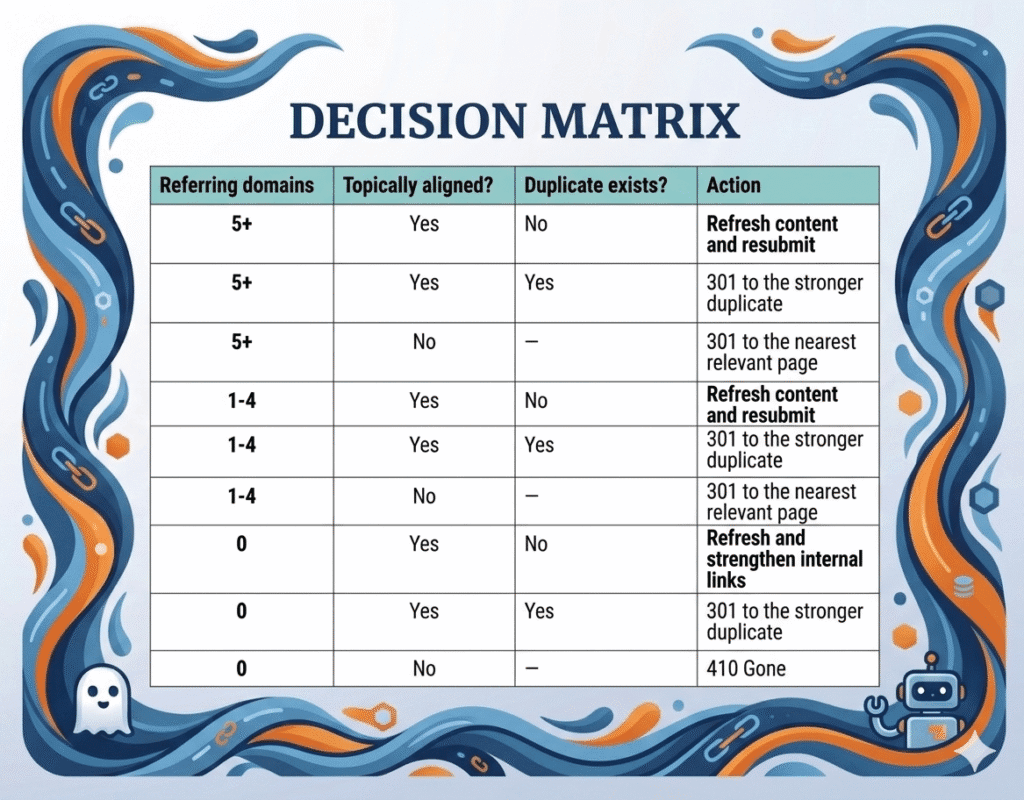
The matrix doesn’t eliminate judgment – “topically aligned” and “duplicate exists” both require real thinking. But it makes the judgment consistent, and consistency is what separates senior SEOs from junior ones when auditing at scale.
For this audit, applying the matrix to the 16 content URLs produced: four new 301 redirects (consolidating duplicates and preserving link equity), one structural fix (content moved out of an /uncategorized/ path into a proper category with updated 301), four 410 Gones (off-topic or zero-value content), two content refreshes scheduled as follow-up work, and four URLs that were already correctly redirected and just needed verification and GSC resubmission. One URL remained flagged for a later decision between keeping the existing 301 or converting it to 410.
This diagnostic layer (deciding what to keep, refresh, or remove) is the foundation of every audit I perform. I use a similar logic to bridge the gap between traditional rankings and AI search visibility, which you can explore in my low-hanging fruit GSC audit strategy for the AI search era.
Redirect Chains Hidden in Plain Sight
One finding worth flagging because it turns up in almost every audit of an older site: redirects that don’t work the way they should.
A URL flagged as “Crawled – currently not indexed” might not be serving a 200 at all. Instead, it might be redirecting – to an irrelevant destination, through a chain, or to the homepage. You only catch these by opening each URL in a browser and watching what happens.
Three patterns to check for:
Redirects to the homepage or to topically unrelated destinations. When a URL is permanently redirected (301) to the homepage or to another page without clear topical alignment, Google recognizes the user intent mismatch. As Google’s redirects documentation explains, Google may classify such redirects as soft 404 errors. In that scenario, the signal transfer breaks. Instead of consolidating authority on the new page, Google may significantly devalue the link equity, treating the redirect as a Soft 404 because the destination isn’t topically equivalent.
Redirect chains (URL A redirects to B, which redirects to C) should always be collapsed. While Googlebot will follow up to 10 redirect hops in a single crawl (according to current Google documentation), the goal is to point A directly to C. Chains increase latency, waste crawl budget, and add a failure point every time content moves again.
Redirects to URLs in /uncategorized/ or similar default WordPress paths are an immediate red flag. That path tells Google the content has no topical classification, which damages how the destination URL is evaluated. The fix is usually moving the content into a proper category and updating the redirect.
In this audit, I found three redirect problems: an old service page redirecting through two hops to the homepage, a content URL sitting in /uncategorized/, and a service URL redirecting to an inconsistent landing path when a clean services path existed. Fixing each preserved link equity that was silently evaporating.
What Actually Got Fixed
The final action breakdown across all 107 flagged URLs:
- 29 URLs: Left as-is in CNI (RSS feeds, login, WordPress system files, robots.txt – expected state)
- 18 URLs: Ignored 404 artifacts (wildcard patterns, system files, draft previews, one deprecated paginated archive, and four orphaned RSS feeds)
- 27 URLs: Resolved through WordPress plugin settings (date archives disabled; author archive pagination disabled while primary author pages kept active)
- 8 URLs: Canonical/parameter verification (no changes needed)
- 9 URLs: 410 Gone applied to old 404s with zero link equity
- 4 URLs: 410 Gone applied to off-topic “Crawled – not indexed” content
- 4 URLs: 301 redirects (consolidating duplicates and fixing chain/homepage redirects)
- 1 URL: Content restructured out of /uncategorized/ into a proper category with an updated 301
- 2 URLs: Scheduled for content refresh (evergreen topics worth strengthening)
- 4 URLs: Already correctly redirected – verified and scheduled for GSC resubmission
- 1 URL: Flagged for later review (borderline decisions between keeping existing 301s vs converting to 410)
The highest-value find: one URL had 47 referring domains. It was already 301-redirected to the correct destination, but the audit confirmed the configuration was clean and triggered a follow-up task – updating internal links across the site so they point to the final URL directly instead of relying on the redirect.
The Framework, Condensed
If you’re looking at your own GSC indexing reports, here’s the process that works:
- Export both reports as CSV. Don’t work from the GSC interface.
- Sort URLs by pattern. Most categories resolve the same way as a group.
- Handle bulk fixes first – disable date archives and author archive pagination in your SEO plugin. One minute of work that often resolves 20-30% of your list.
- Leave the “expected state” URLs alone. RSS feeds, login pages, and system files are supposed to be crawled but not indexed.
- For content URLs, check backlinks at the URL level (not path), check topical alignment, and check for on-site duplicates.
- Apply the decision matrix. Refresh, redirect, or remove.
- Open every URL in a browser before finalizing. Redirect problems hide in plain sight.
- Implement all changes in one session and resubmit the affected URLs in GSC. Monitor for four weeks.
Key Takeaways
- Not every GSC indexing issue needs to be fixed – some flagged URLs represent the expected handling for that URL type, and blocking them in robots.txt creates worse problems than leaving them alone
- Of the dozen or so reports GSC surfaces, “Not found (404)” and “Crawled – currently not indexed” are the two that almost always deserve priority attention
- 410 sends a more explicit removal signal at the server level than 404, but Google treats both as deindexation signals with no meaningful SEO difference in practice
- Redirects to the homepage or to topically unrelated destinations may be classified as soft 404s, which can significantly devalue the link equity they would otherwise pass
- Redirect chains and broken redirects hide beneath flagged URLs; you only find them by opening each URL in a browser
The Bottom Line: Patterns, Not Problems
GSC indexing reports are diagnostic tools, not task lists.
The senior SEO mindset shift is this: read the signals first, decide if action is needed second, and apply the decision matrix only to URLs that pass both checks. Of the 107 URLs flagged in this audit, only 25 required real individual judgment – the rest were either bulk fixes or intentional no-ops.
If you’re spending hours debating every flagged URL in your GSC report, you’re treating the symptom, not the strategy.
Pattern recognition saves the day.
Triage saves the week.
I take on clients for technical audits and holistic SEO strategies.
If your GSC report looks like a mess and you’re not sure where to start, contact me – let’s turn that data into a prioritized roadmap.